


Setting a climate controller: probe, minimum and maximum
Useful settings start with a representative measuring position and a suitable fan. Check temperature, minimum speed and maximum together, then assess behaviour with the lights on and off.
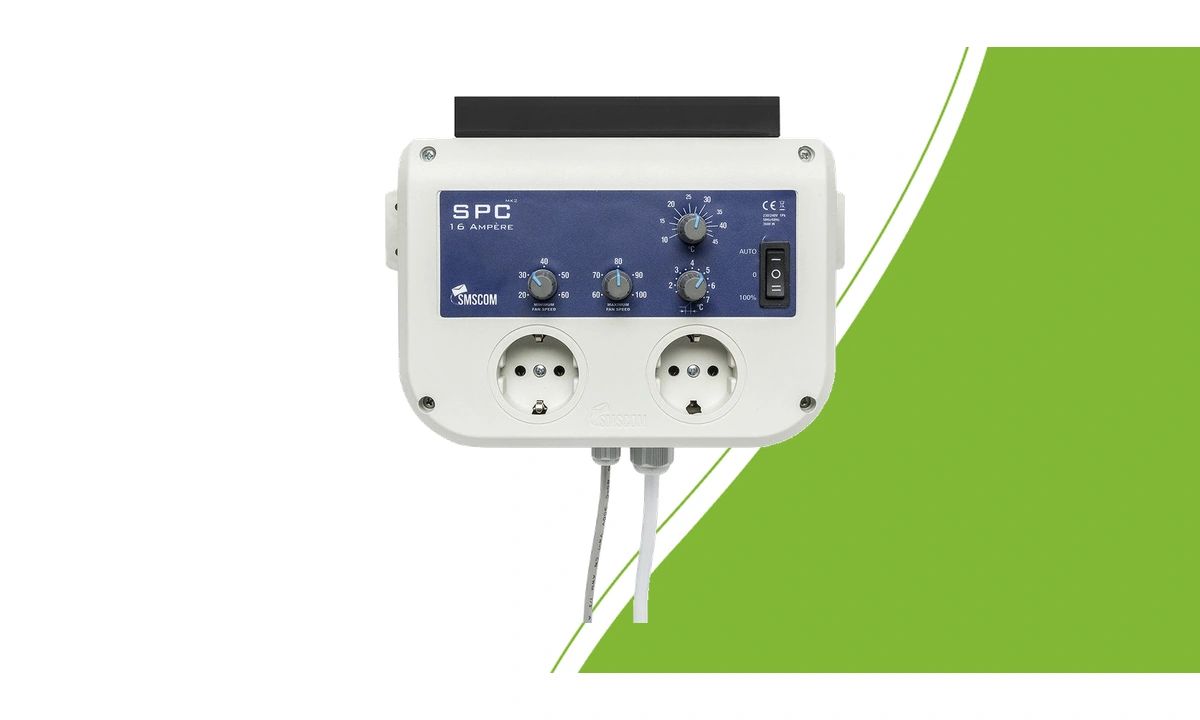
Start with a suitable combination
Before adjusting settings, check that motor, control method, voltage and load match. Turning a dial cannot make an unsuitable fan compatible. Read our climate controller selection guide if the combination is not yet confirmed.
Follow the controls and connection requirements for your exact version. Disconnect the power before changing connections and have uncertain electrical combinations assessed before switching them on. Install the controller where the conditions meet its operating requirements.
Give the probe a representative measuring position
The controller responds to what its probe measures. Choose a position that represents conditions around the plants, away from direct lamp heat, warm equipment and the immediate intake air jet. A probe beside the extraction point may read differently from the area you want to control.
Compare the reading with a suitable independent meter in the same position. Recheck after moving lights, changing airflow or a significant change in plant height. Follow the placement requirements for the exact sensor model.
Assess minimum, maximum and temperature together
The minimum setting determines how the fan continues running below the control threshold. Do not set it lower than the fan and controller permit. With SMSCOM SPC MK2, the fan must keep running at minimum. An excessively low setting increases the risk of humming.
The SMSCOM SPC 8A MK2 and 16A MK2 have adjustable minimum and maximum speeds and a temperature setting. The bandwidth determines how control responds between those limits. Do not simply copy another room’s settings; check what your fans actually do.
Work through the settings step by step
Check connections, an unobstructed air path and probe position.
Set a permitted minimum and maximum.
Choose a temperature appropriate for your plants and setup.
Check that the fans respond as intended.
Change one setting at a time and record the result.
Also assess the transition between lights on and lights off.
Do not reduce ventilation solely to lower noise if the motor then runs unevenly or air exchange becomes inadequate. First check the equipment combination, air resistance and control method.
Treat humidity control and expansions separately
A temperature controller does not automatically measure humidity. Check humidity with a suitable meter and use a specifically supported function if you want to control it. Our guide to temperature, humidity and VPD explains the different measurements.
An SMSCOM SPC Slave expands a suitable main controller; it does not replace it. Check exact model versions and connections before expanding. Browse climate controllers to choose a combination by function and permitted load.